Performance Testing Fundamentals
Performance testing checks how well a system behaves under a given workload. It answers three questions:
- Speed: How fast does it respond?
- Capacity: How many users or requests can it handle?
- Stability: Does it stay reliable under pressure and over time?
Performance testing does not check whether features work correctly. That is the job of functional testing. A login page can be 100% functionally correct and still take 20 seconds to load when 1,000 people use it at once.
Where performance testing fits
Software testing splits into two big families:
- Functional testing asks "Does it work correctly?" (unit, integration, E2E, UAT).
- Non-functional testing asks "How well does it work?"
Performance testing is one branch of non-functional testing, alongside security, usability and reliability testing. Load, stress, spike, endurance and scalability are all types of performance testing.
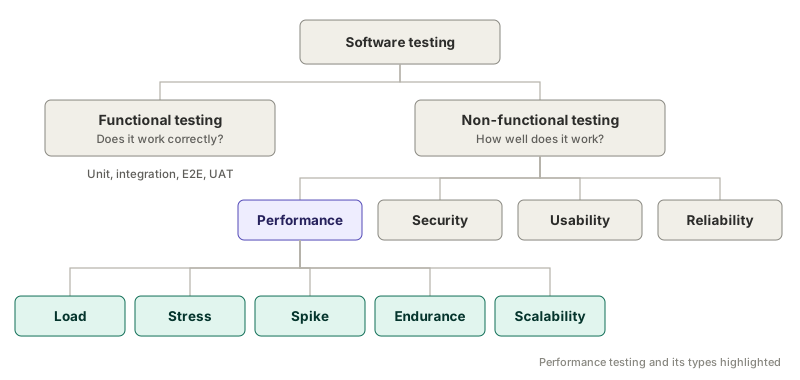
This is why performance targets are usually written in an NFR (Non-Functional Requirements) document. Targets like "average response time ≤ 3s" or "error rate ≤ 0.5%" describe how well a system performs, not what it does.
Test types at a glance
Every performance test type uses the same test script. What changes is the shape of the load over time, and each shape answers a different question.
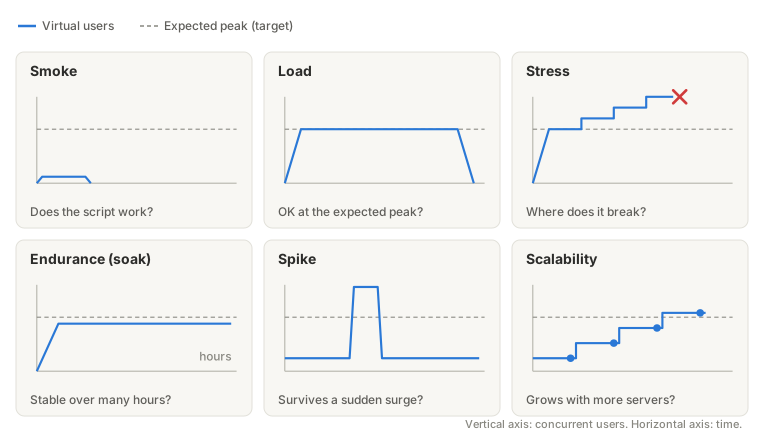
| Type | Question it answers | Load pattern | What it typically catches |
|---|---|---|---|
| Smoke | Does the script work? | A few users, very short | Broken scripts, bad test data, wrong environment |
| Load | Do we meet targets at the expected peak? | Ramp to expected peak, hold, ramp down | Slow pages and errors at normal peak traffic |
| Stress | Where does it break, and how? | Step up beyond the peak until it fails | Capacity limit, failure behaviour |
| Endurance (soak) | Does it stay stable over many hours? | Steady load held for a long time | Memory leaks, unreleased DB connections, growing caches or logs |
| Spike | Can it survive a sudden surge and recover? | Normal, then a sudden jump far above peak, then back | Crashes during surges, slow recovery |
| Scalability | Does capacity grow when we add resources? | Step up, measuring at each level (often with infra changes between runs) | Bottlenecks that stop the system from scaling out |
Commonly confused pairs
Load vs. stress. A load test stays at the expected peak and gives a pass/fail against targets. A stress test goes past it on purpose to find the breaking point. Load gives you a verdict. Stress gives you a capacity number.
Stress vs. spike. Stress climbs in steps and lets the system settle at each level. A spike jumps almost instantly, far above normal, then drops back. It tests absorbing a surge and recovering from it.
Load vs. endurance. The load level can be identical. The difference is time. Some problems (memory leaks, connection pool exhaustion, disk filling with logs) only appear after hours, so a 30-minute load test will never catch them.
Stress vs. scalability. Both climb in steps. Stress asks where this setup breaks. Scalability asks whether adding servers or resources increases capacity in proportion.
A "payday" scenario where everyone logs in at once has a steep ramp like a spike, but it rises to the expected peak and holds there. That makes it a load test with a short ramp-up, not a spike test.
Naming quirks
- "Load testing" is often used loosely to mean performance testing in general. Many tools brand themselves as "load testing" platforms but support every type. When someone says "load test", confirm whether they mean the specific type or the whole family.
- Smoke testing is not strictly a performance type. It is a quick "does it basically work" check used across all kinds of testing. In performance work, it is the step before any real run.
Mapping to your tool
The test types above are tool-neutral. How you set each one up depends on the tool:
- Mapping to JMeter: one test plan, load set with
-Jproperties. - Mapping to k6: one script, load shape picked with
-e PROFILE=....