Mapping Test Types to k6
Every test type in Performance Testing Fundamentals uses the same script with a different load shape. In k6 the load shape lives in the script's options, so you can keep one script and choose the shape at run time with an environment variable.
One script, many shapes
k6 describes a shape as a list of stages: each stage says "move to this many virtual users (VUs) over this long". Unlike a standard JMeter Thread Group, a single k6 run can step up, hold, drop and recover, so stress and spike tests need no plugins.
import http from 'k6/http';
import { check, sleep } from 'k6';

const PEAK = Number(__ENV.USERS || 1000); // expected peak from the NFR

const profiles = {
  smoke: [{ duration: '1m', target: 5 }],
  load: [
    { duration: '30s', target: PEAK },  // ramp up
    { duration: '30m', target: PEAK },  // hold at peak
    { duration: '1m', target: 0 },      // ramp down
  ],
  stress: [
    { duration: '2m', target: PEAK * 1.2 }, { duration: '5m', target: PEAK * 1.2 },
    { duration: '2m', target: PEAK * 1.5 }, { duration: '5m', target: PEAK * 1.5 },
    { duration: '2m', target: PEAK * 2 },   { duration: '5m', target: PEAK * 2 },
    { duration: '2m', target: 0 },
  ],
  endurance: [
    { duration: '10m', target: PEAK },
    { duration: '4h', target: PEAK },
    { duration: '5m', target: 0 },
  ],
  spike: [
    { duration: '2m', target: PEAK / 2 },  // normal traffic
    { duration: '5s', target: PEAK * 2 },  // sudden surge
    { duration: '3m', target: PEAK * 2 },
    { duration: '5s', target: PEAK / 2 },  // back to normal
    { duration: '3m', target: PEAK / 2 },  // does it recover?
  ],
};

const PROFILE = __ENV.PROFILE || 'smoke';
if (!profiles[PROFILE]) throw new Error(`Unknown PROFILE "${PROFILE}"`);

export const options = {
  stages: profiles[PROFILE],
  thresholds: {
    http_req_duration: ['avg<3000'], // NFR: average response time <= 3s
    http_req_failed: ['rate<0.005'], // NFR: error rate <= 0.5%
  },
};

export default function () {
  const res = http.get(`${__ENV.BASE_URL}/`);
  check(res, { 'status is 200': (r) => r.status === 200 });
  sleep(3); // think time
}
The two thresholds are the NFR targets from the fundamentals page. When one is crossed, k6 marks the run as failed and exits with a non-zero code, which makes a load test a clear pass/fail in CI.
Run command per test type
What each profile does to the number of users, drawn from the stages above:
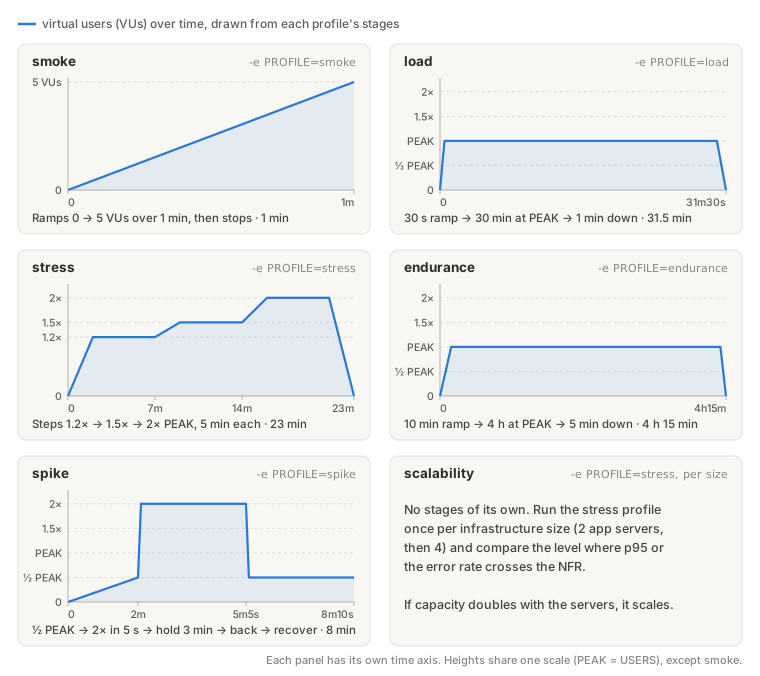
| Type | Command |
|---|---|
| Smoke | k6 run -e PROFILE=smoke -e BASE_URL=https://test.example.com script.js |
| Load | k6 run -e PROFILE=load -e USERS=1000 -e BASE_URL=... script.js |
| Stress | k6 run -e PROFILE=stress -e USERS=1000 -e BASE_URL=... script.js |
| Endurance | k6 run -e PROFILE=endurance -e USERS=1000 -e BASE_URL=... script.js (about 4 hours) |
| Spike | k6 run -e PROFILE=spike -e USERS=1000 -e BASE_URL=... script.js |
| Scalability | The stress profile again after each infrastructure change (e.g. 2 app servers, then 4), comparing the capacity at each size |
k6 inspect -e PROFILE=stress -e USERS=1000 script.js prints the options k6 will use, including every stage, without sending a single request. Run it before a long test. A typo in the profile name fails here, because the script throws on an unknown PROFILE instead of quietly falling back to k6's default of one user.
Stages control VUs, like JMeter threads. If your NFR is a request rate (e.g. "200 TPS"), use the ramping-arrival-rate executor instead, so k6 holds the rate steady even when the server slows down.
For the full workflow (auth, data, executors, reporting), see the k6 track.